NETWIZ Pty Ltd
A.C.N. 009 398 672

How to use TZUtil

P.O. Box 3335
Broadway Nedlands
Perth WA 6009
Tel (08) 93868340
  •   Netwiz Home  
    • Netwiz Pty Ltd Home Page 
  •   MonTel  
    • MonTel Call Accounting System 
    • MonTel Application Notes 
    • What is MonTel? 
    • MonTel Screen Shots 
    • Why you need MonTel ►
      • Why you need MonTel 
      • Additional Features of the MonTel Client 
      • Why MonTel is like no other system 
      • The Product ►
        • The Product 
        • Hardware Requirements for the MonTel System 
        • Old Computer ? 
  •   Software  
    • MonTel and other software downloads 
    • Downloads for MonTel customer sites ►
      • Downloads for MonTel customer sites 
      • Download Montel32 v2.11 
      • Download Montel32 v2.12 
      • Legal Notices 
      • License Key Generator 
      • Netwiz MonTel License Agreement 
      • Netwiz (MonTel) beta test sites 
    • Telephone Extension List ►
      • Telephone Extension List 
      • Netwiz Telephone Extension List (Ext32) License Agreement 
      • Edit Users 32bit (for Ext32 only) 
    • Time Zone Utility - TZUtil ►
      • Time Zone Utility - TZUtil 
      • How TZUtil (MonTel Time Zone Adjust) works 
      • TzUtil Quick Guide 
      • How to use TZUtil 
      • Using TzUtil for DST changes on a network 
      • TzUtil - PABX.INI file settings ►
        • TzUtil - PABX.INI file settings 
        • TimeZoneDisplay 
        • TZStandardName 
        • TZDaylightName 
        • TZStandardGMTModifyMins 
        • TZDaylightStartDateTime 
        • TZDaylightEndDateTime 
        • TZDaylightSTDModifyMins 
        • ConfirmTimeZoneMatchesOS 
        • SetUserFeedbackLevel 
        • ShowWindowsTimeZoneInfo 
      • Netwiz Time Zone Adjust License Agreement 
    • Free Tools for AuthorIt ►
      • Free Tools for AuthorIt 
      • Fsetop Download 
      • UK English style spelling list 
      • FseTop Commands 
      • Netwiz FSetTop and Strpcr32 Licence Agreement 
      • Frame Sets for topics (FSetop) ►
        • Frame Sets for topics (FSetop) 
        • FSeTop CSS menu using Unordered Lists 
  •   Support  
    • Support for MonTel and Other applications 
    • MonTel Application Notes 
    • Ext32 Support 
    • Ext2 Support 
    • EdUser32 support 
    • EdIni32 support 
    • TzUtil Support 
    • MonTel Support 
  •   Contacts  
    • Contacts 
    • Other Links 
  •   About Netwiz  
    • About Netwiz Pty Ltd 
    • Digital Signature Certificate Policy 
    • Privacy Policy 
    • News ►
      • News 
      • History 2003 to 2005 
      • History 1995 to 2002 

Netwiz Pty Ltd Privacy Policy and Digital Signature.


This web site last updated:
2008-11-01.


For problems, comments and issues about this site please E-mail the Netwiz Web Master: webmaster @netwiz.com.au.


© 1997-2008 Netwiz Pty Ltd.


MonTel sends call records from your phone system Telephone live live to you to your Computer computer network.

FREE DOWNLOADS

TzUtil
TZUtil

TzUtil

TzUtil: See and optionally adjust the time zone on yours or a network of computers from an 'ini' file.


Telephone Extension List

Replace a printed list of  extensions, keeping everyone up to date, saving paper,  time and hassle.

Netwiz »  Software » Time Zone Utility  » How to use TZUtil

How to use TZUtil

There is not a lot to it. If the time zone settings are different in the PABX.INI file and Windows TzUtil prompts you to change the Time Zone. Of course, if it has just created the PABX.INI file it will be correct, so close TZUtil, edit the PABX.INI in Notepad to a different time zone, and run TZUtil again.

In the example below, it is asking if the time zone should be changed from a (Sydney, Melbourne, Hobart) EST time zone to a Perth Time Zone.

If you need to change, it  will add a NEW time zone entry into your registry, so you can go back to  the old one if you need to. The New one is called MonTel adjust, or whatever name you give it in the TimeZoneDisplay setting in the PABX.INI file. For details on the settings see: TimeZone Section in the PABX.INI file documentation.
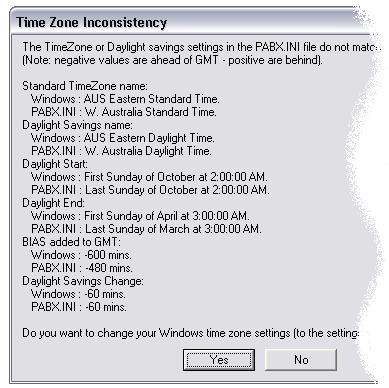
Time Zone Inconsitency

Here, the test computer was meant to be set up for the new Australian Eastern States time zone, so I pressed 'No'. Had I pressed yes MonTel would have changed the time zone on the computer to use the Western Australian settings from the PABX.INI file.

See Also

Time Zone Utility - TZUtil

How TZUtil (MonTel Time Zone Adjust) works

TzUtil Quick Guide

Using TzUtil for DST changes on a network

TzUtil - PABX.INI file settings

Netwiz Time Zone Adjust License Agreement

Are you up-to-date ? The latest is MonTel release 2.12.9. Remember, there are free MonTel updates for customers on current maintenance plans.

Comment on this page

Comments on anything from spelling or grammar mistakes to technical or aesthetic issues will be keenly received. Please include your e-mail address -- you will receive an automatically generated acknowledgment that your comment has been received. Please check that your E-mail address is correct. We will not spam you or release your email address to third parties as outlined in the privacy statement.